
MacBook Air Spill Fixed With a Clean: A Real Repair in St Andrews
MacBook Air Spill Fixed With a Clean: A Real Repair in St Andrews
MacBook Air Spill Fixed With a Clean: A Real Repair in St Andrews
This MacBook Air came into our City Road shop in August, booked in for a diagnostic. Once we had it apart, we found liquid on the trackpad and inside the laptop.
We stripped it down and cleaned it. It didn’t need a single new part, it ran for over 12 hours without a problem afterwards, and it went home the next day for £129.
What We Found Inside
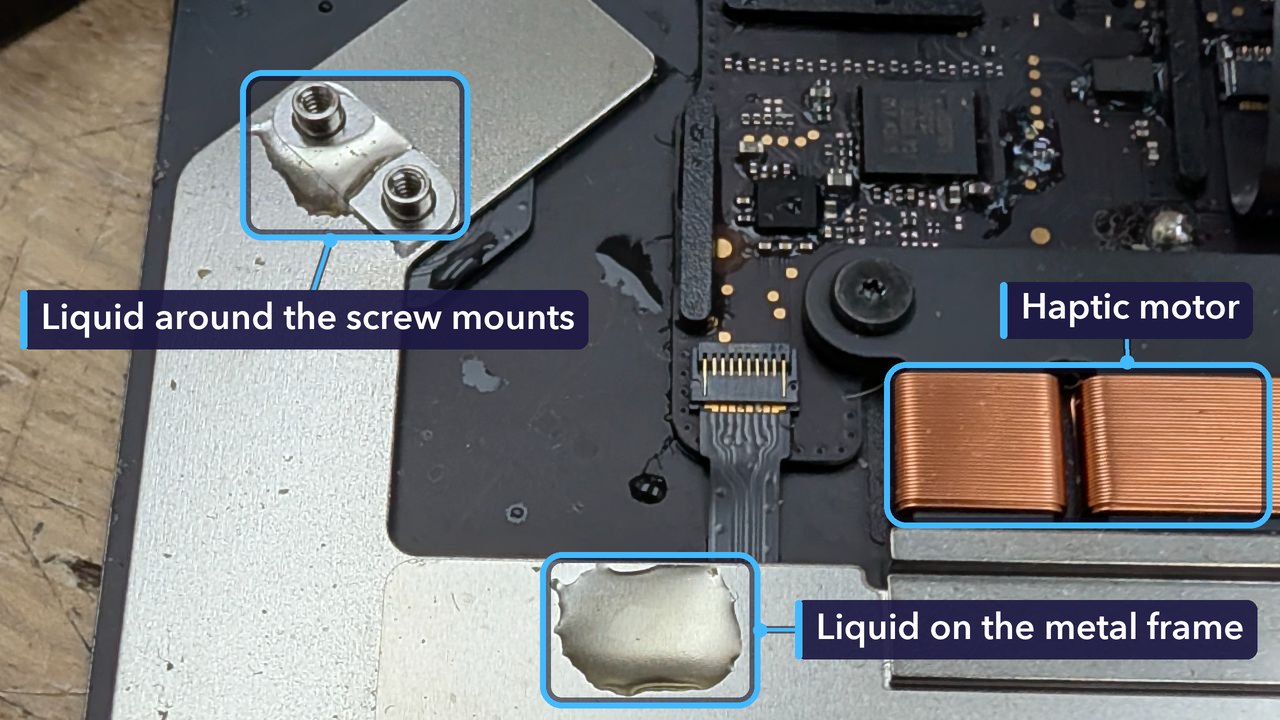
There’s a thin gap all the way round a MacBook’s trackpad, and liquid that lands near the front of the laptop can find that gap and run underneath, out of sight.
On this one, liquid had reached the back of the trackpad, its metal frame and its own small circuit board, and it had got further inside the laptop too.
Liquid on a metal frame is one thing. On a circuit board with power running through it, it’s quite another.
Why a Clean Was Enough
A spill doesn’t always break anything the moment it gets in. Often the harm comes later. Liquid left inside reacts with the metal on the circuit boards and starts to corrode it, and given long enough, that corrosion eats through the tiny connections between parts until no amount of cleaning will bring them back.
Here, the clean was the repair. We didn’t replace a thing.
Not every spill ends this way. Where corrosion has already set in, it usually means a new part or a repair to the main board. The sooner the liquid comes out, the better the chance that a clean is all it takes.
For the Technically Curious
This MacBook Air has Apple’s Force Touch trackpad. Nothing inside it actually clicks. Sensors measure how hard you press, and a small haptic motor, which Apple calls the Taptic Engine, gives a tiny tap that feels just like a click. The copper coils labelled in the first photo are that motor.
The trackpad has its own circuit board too, packed with chips and tiny parts, and a thin flex cable links it to the Mac’s main board.
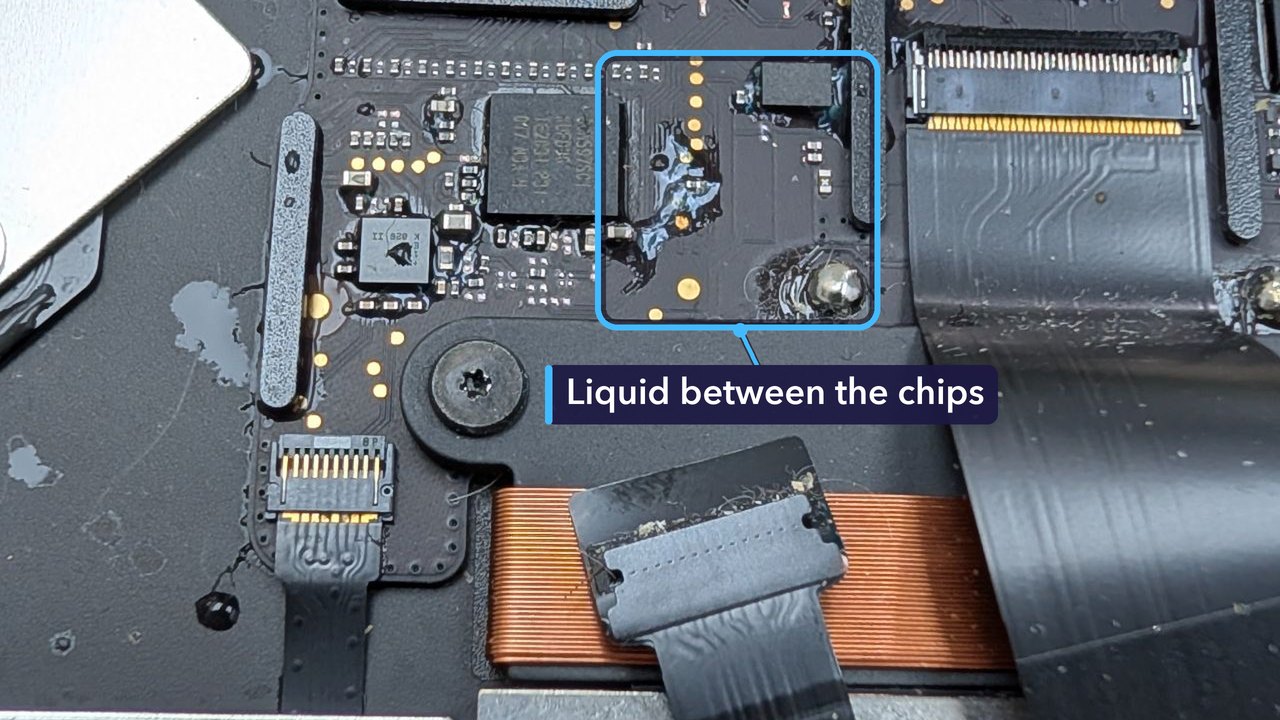
So why does liquid on a board matter? Wherever it bridges two points at different voltages, a small current flows through it, pulling metal away from one point and laying it down on the other. Give it time and you get the blue-green crust of corrosion, plus broken or shorted connections.
Pure water is a poor conductor. What’s dissolved in it is the problem: minerals in tap water, acids in drinks, and the sticky film that sugary drinks leave as they dry.
Liquid faults can also come and go. A quick power-on after a clean doesn’t tell you much, while a long run gives anything that’s still wrong the chance to show itself. This one ran for over 12 hours without a fault.
Spilled Something on Your MacBook? Do This First
- Turn it off straight away. If it won’t shut down, hold the power button for about ten seconds.
- Unplug the charger and anything else connected to it.
- Don’t switch it back on to see if it works. Power and liquid together make corrosion far worse.
- Open the lid wide and stand it upside down on a dry towel, like a tent, so liquid can drain out.
- Leave the rice in the cupboard and the hairdryer in the drawer. Rice can’t pull liquid out from under a keyboard, and hot air can push it further in.
- If you know what was spilled and when, tell us. It helps us know what to look for.
- Bring it in as soon as you can.
How Much Did It Cost, and How Long Did It Take?
£129 in total. That covered taking it apart, the clean and the long run afterwards. There were no parts to pay for.
It came in on a Friday afternoon, and we started on it that day. It ran right through the night. By Saturday morning it was ready, and it went home just after midday, less than a day after it arrived.
Every spill is different. The price depends on where the liquid got to and whether it had time to do any damage first.
Get Your MacBook Fixed in St Andrews
Had a spill? Switch your MacBook off and bring it in. We’ll find out where the liquid has got to and give you a quote. No appointment needed.
If liquid has reached the main board, we handle logic board repair too, and you can read about our other MacBook repairs as well.
Repair St Andrews, 1 City Rd, St Andrews, KY16 9XQ. Call 01334 478866 or walk in. Open Monday to Friday 09:30-17:30, Saturday 10:00-17:00.
