
// MACBOOK BATTERY REPLACEMENT
MacBook Battery Replacement in St Andrews. Full Power Restored
When your MacBook battery is degraded, everything about using it becomes frustrating. It shuts down unexpectedly at 20 or 30 per cent. It barely lasts an hour away from the charger. The trackpad feels stiff or clicks on its own because a swollen battery is pushing up from underneath. You cannot take it to lectures, you cannot work from a cafe, and you certainly cannot trust it on a train journey. At Repair St Andrews, we replace MacBook batteries quickly and affordably. Far less than Apple charges. So you can get back to using your laptop the way it was designed: untethered. Bring it to our workshop at 1 City Rd, and we will have it sorted.
Signs Your MacBook Battery Needs Replacing
Rapid Battery Drain
If your MacBook goes from fully charged to dead in under two hours of normal use, the battery cells have degraded past their useful lifespan. MacBook batteries are rated for roughly 1,000 charge cycles before they drop below 80 per cent capacity.
Unexpected Shutdowns
Your MacBook shows 25 or 30 per cent remaining but suddenly powers off. This happens when degraded cells can no longer deliver enough voltage under load, causing the system to cut power to protect itself.
Swollen or Bulging Battery
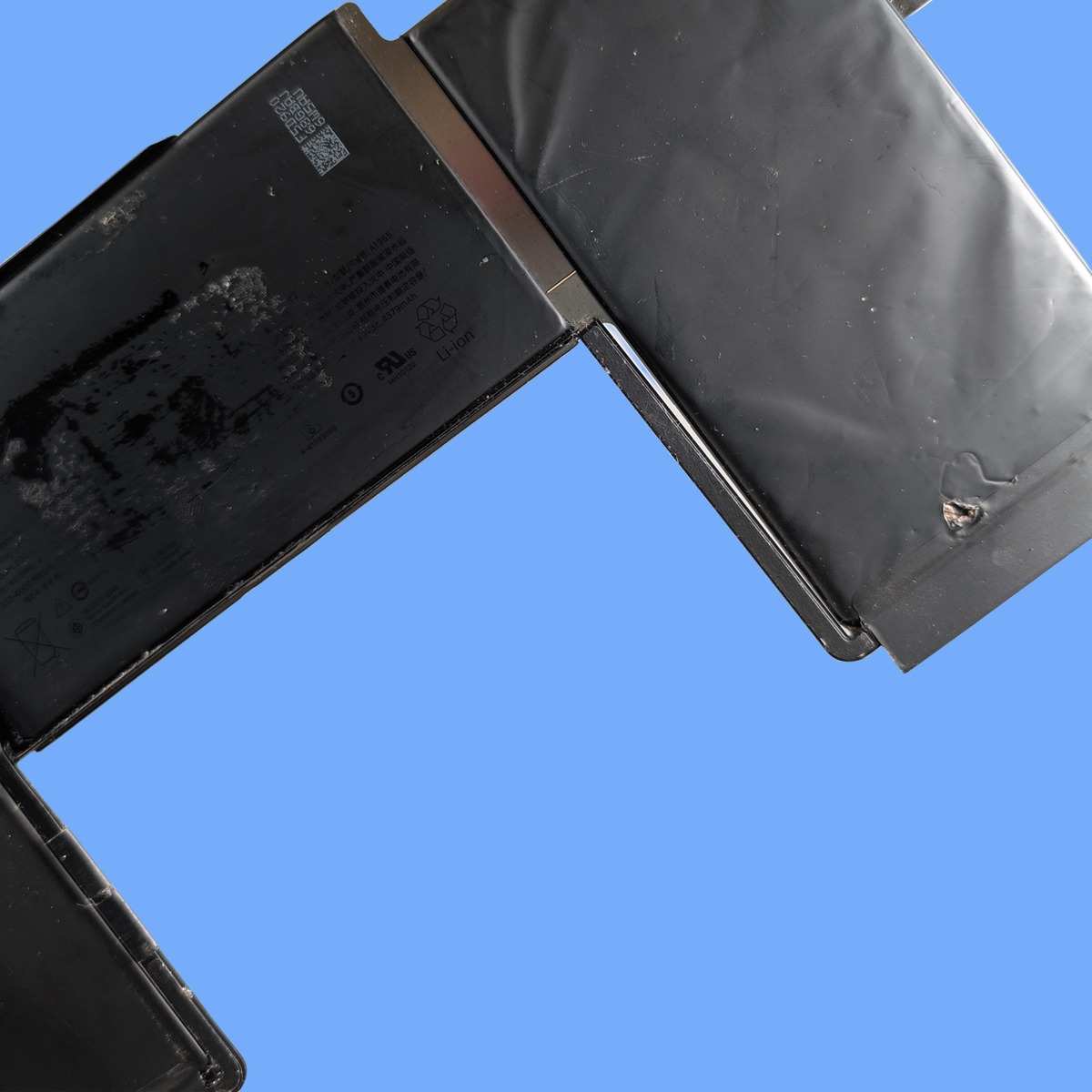
If your trackpad is raised, clicks feel uneven, or the base of your MacBook no longer sits flat on a table, the battery cells have begun to swell. This is a safety concern and should be addressed promptly.
“Service Battery” Warning
Apple's built-in battery health monitoring will display this warning when the battery has dropped below its minimum functional threshold. Once you see this message, replacement is the only real fix.
Only Works When Plugged In
If removing the charger causes an immediate shutdown, the battery is either completely dead or has an internal fault preventing it from holding any charge.
// OUR PROCESS
Our Battery Replacement Process
We keep the process simple so your device is back in your hands quickly.
Battery Health Assessment
We run Apple's built-in diagnostics alongside our own testing tools to check the battery's cycle count, maximum capacity, and voltage output under load. This confirms whether the battery genuinely needs replacing or if a software issue or charging fault is the real problem.
Safe Battery Removal and Replacement
MacBook batteries are adhesive-mounted and, in many models, connected near sensitive components. We carefully remove the old battery, clean the adhesive residue, and fit a new high-quality replacement cell matched to your specific MacBook model. Every battery we fit meets or exceeds Apple's original capacity rating.
Calibration and Testing
After installation, we calibrate the new battery by running a full charge-discharge cycle and resetting the battery management system. We test that macOS reports the correct capacity, that the charge holds under real-world use, and that the trackpad and base sit flush and level.
Turnaround Time
MacBook battery replacements are typically completed same-day or next-day. We order the correct battery for your specific MacBook model. Parts arrive quickly and are fitted within a few hours of delivery. For most models, you can drop the MacBook off in the morning and collect it later the same day.
Pricing
Battery replacement costs depend on your MacBook model. MacBook Air batteries are generally the most affordable, while MacBook Pro 15-inch and 16-inch models cost more due to larger battery assemblies. In every case, we charge significantly less than Apple’s official battery service. Diagnosis is free, and we provide a clear quote before starting any work. Call 01334 478866 for a quote specific to your model.
Frequently Asked Questions
How long should a MacBook battery last before it needs replacing?
Apple rates MacBook batteries for approximately 1,000 full charge cycles, which translates to roughly three to five years of typical daily use. After that, the battery retains less than 80 per cent of its original capacity and performance drops noticeably. Heavy users. Those who charge and discharge daily. Will reach this threshold sooner.
Is a swollen MacBook battery dangerous?
A swollen battery should be taken seriously. While lithium-polymer batteries are designed with safety margins, a swollen cell is under internal stress and should not be left in a machine long-term. Do not puncture it, do not try to remove it yourself, and avoid leaving the MacBook in hot environments. Bring it to us and we will remove it safely and fit a replacement.
Can I replace my MacBook battery myself?
We would not recommend it. MacBook batteries are glued in with strong adhesive, and the removal process involves working near the logic board, display cables, and other delicate components. The batteries themselves are lithium-polymer cells that can be hazardous if punctured or bent. Professional replacement ensures the job is done safely and correctly.
Do you use genuine Apple batteries?
We use high-quality aftermarket batteries that match or exceed Apple’s original specifications for capacity, voltage, and charge cycles. These cells are manufactured to the same standard as Apple’s original components and come with a warranty. Apple does not sell genuine batteries as standalone parts to independent repair shops.
Will a new battery make my old MacBook faster?
If your MacBook has been throttling performance due to a degraded battery. Which macOS does automatically to prevent unexpected shutdowns. Then yes, a new battery will restore full processing speed. Many customers are surprised at how much faster their MacBook feels after a battery replacement.
How many charge cycles should a MacBook battery last?
Apple designs MacBook batteries to retain 80 per cent of their original capacity after 1,000 complete charge cycles. A charge cycle is one full discharge from 100 per cent to 0 per cent. So charging from 50 per cent to 100 per cent twice counts as one cycle. You can check your current cycle count in macOS by going to the Apple menu, then About This Mac, then System Report, then Power. If you are approaching or past 1,000 cycles and noticing shorter battery life, it is time for a replacement.
Will battery replacement improve my MacBook's speed?
It can, yes. macOS throttles processor performance when the battery is severely degraded to prevent unexpected shutdowns. If your MacBook has been feeling sluggish. Apps take longer to open, everything feels a step behind. A new battery can restore the original processing speed. We see this regularly with MacBook Pro models from 2016 to 2020. If speed is your main concern, bring it in and we will run a diagnostic to confirm whether the battery is the bottleneck.
Can I use my MacBook while the battery is being replaced?
No, the MacBook needs to be powered down and disassembled for the battery replacement. The good news is that most replacements are done within two to three hours, so you will not be without it for long. If you need to transfer urgent files before we start, just let us know and we can help with that. You are also welcome to wait in St Andrews while we work. We are right beside the West Port with plenty of cafes nearby.
We also offer full MacBook repair services, laptop battery replacement for all brands, and MacBook screen repair. See all our computer repair services in St Andrews. If you know your model, you can book directly for your MacBook Pro 16" M2 Pro / M2 Max, MacBook Air 13" M2, MacBook Pro 13" M2 and MacBook Air 15" M2. Head back to our homepage to see the full range of services we offer.
// GET STARTED
Book Your MacBook Battery Replacement
Visit us at 1 City Rd, St Andrews, KY16 9XQ | Mon–Fri 09:30–17:30, Sat 10:00–17:00