
Dell Laptop Won’t Start: A Real Motherboard Repair in St Andrews
Dell Laptop Won’t Start: A Real Motherboard Repair in St Andrews
Dell Laptop Won’t Start: A Real Motherboard Repair in St Andrews
This Dell laptop came into our City Road shop at the end of August. It wouldn’t start. Once we had it apart, the problem was easy to spot: a burn mark on the motherboard, with black soot spread over the parts around it.
Our board-level technician repaired the motherboard itself, so the laptop didn’t need a new one. It was ready to collect nine days after it came in, and the bill came to £199.
What We Found Inside
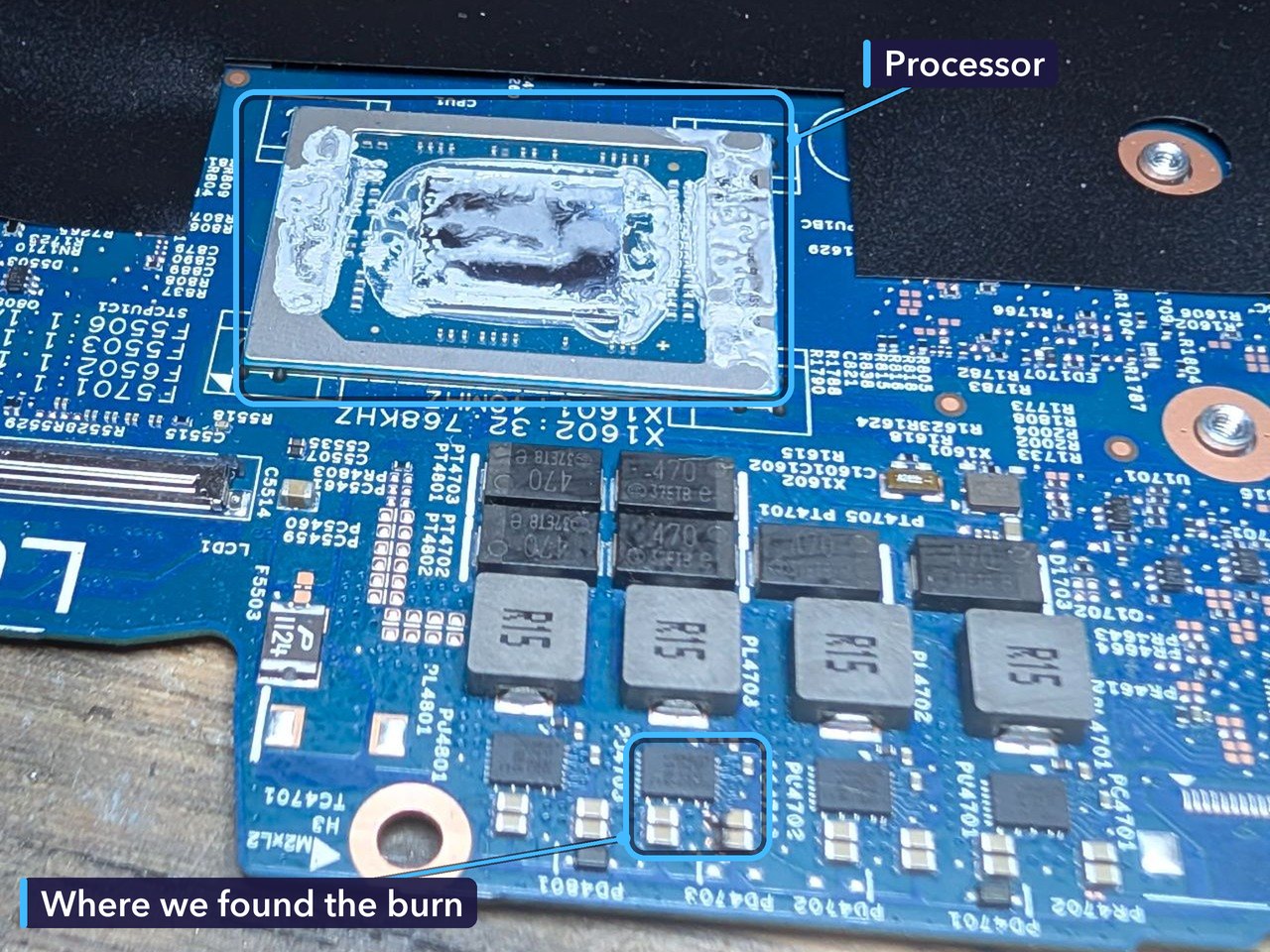
A laptop that won’t start isn’t always a big job. Sometimes it’s the charger, the battery or a memory stick that’s worked loose. Not this time. The fault was on the motherboard, so the board had to come out for a proper look.
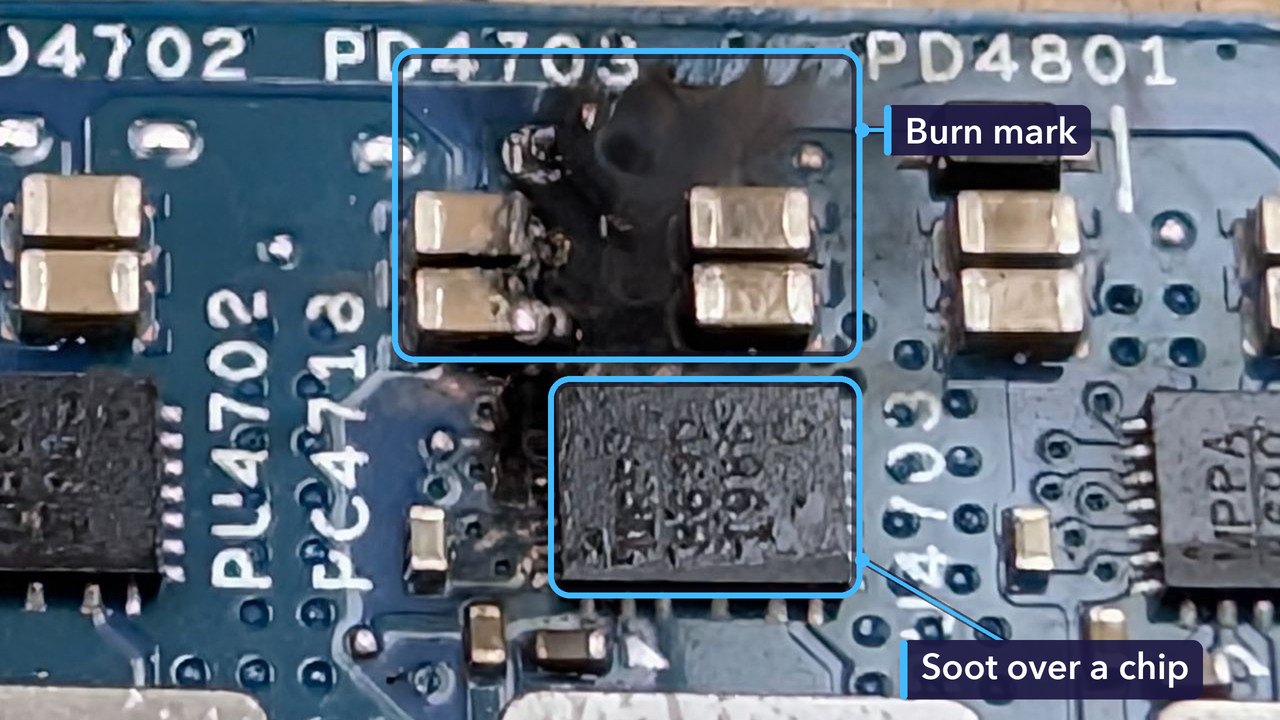
A burn mark means something on the board got hot enough to scorch it. Soot cleans off. The damage underneath doesn’t, and a fault like that is enough to stop a laptop starting at all.
Why It Wouldn’t Start
It came in failing to POST. That’s short for power-on self-test. Every time you press the power button, a laptop checks its processor, memory and other key parts before it loads anything else, and if that check can’t finish, it stops right there.
When the fault is on the motherboard, most people expect to need a whole new board, which can be expensive and, for some models, hard to find at all. Board-level repair is different. It means tracking down the damaged parts and putting them right, which takes a microscope, the right tools and a steady hand. That’s the work our board-level technician did on this Dell.
For the Technically Curious
The burn was close to the processor, beside a row of four square grey coils marked R15. That’s the coil maker’s code for 0.15 microhenries. On most laptop boards, a row of coils like this next to the processor, each with a small chip beside it, is the circuit that powers the processor. It turns the power from the charger or battery into the much lower voltage the processor runs on.
Like most modern laptops, this Dell has its processor soldered straight onto the motherboard. The grey smears on it are old thermal paste, left behind when the cooler came off. The printed labels nearby, such as PD4703 and PL4703, are how a technician finds each part on the board’s circuit diagrams.
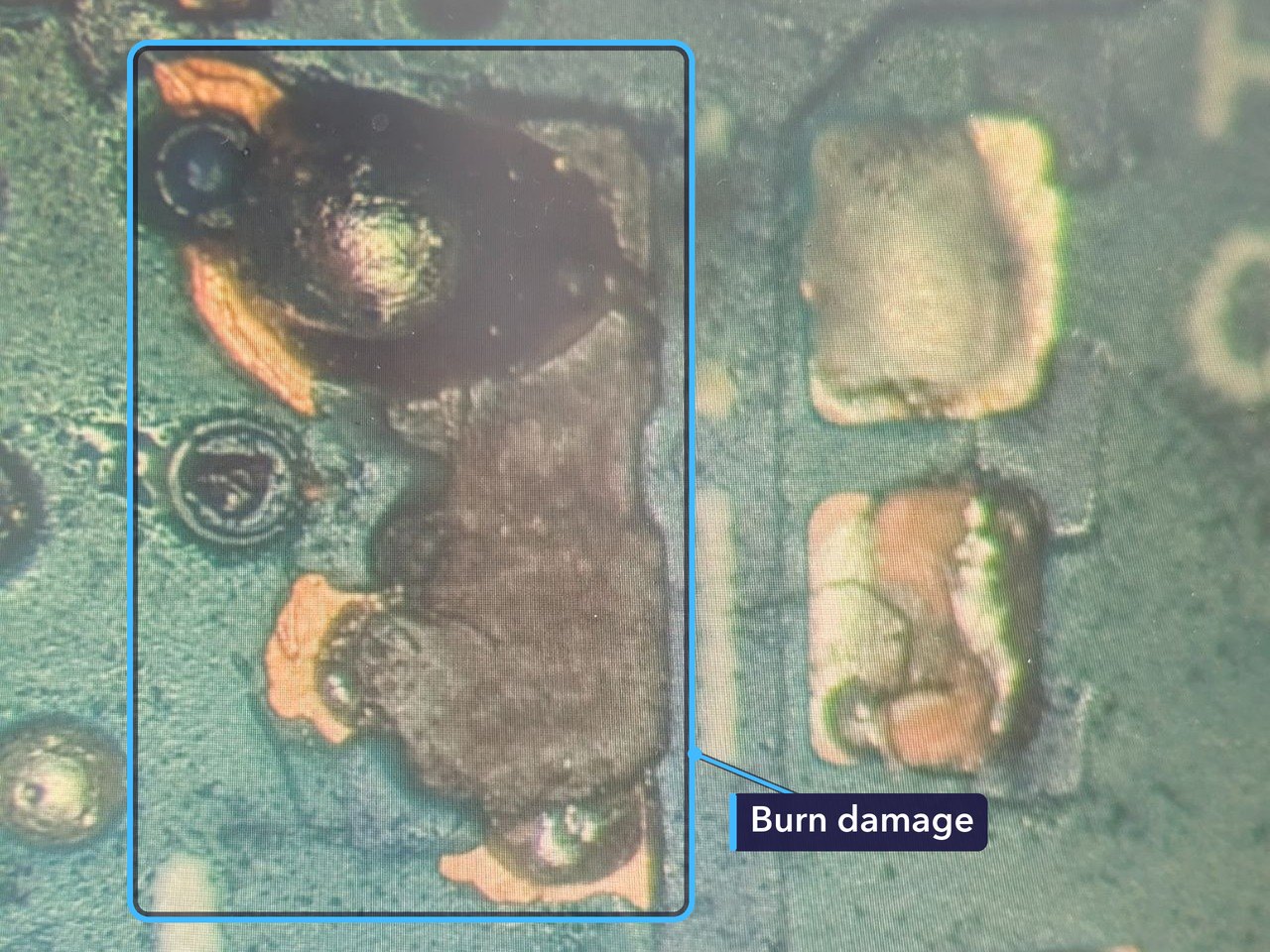
A thin coating normally covers the copper on a circuit board, so seeing it bare is a sign of how hot that spot got. A repair like this usually means removing the damaged parts, cleaning up the area, checking the circuit for shorts and fitting new parts where they’re needed.
Dell Laptop Won’t Start? Try These First
- Check the charger. Make sure it’s the right one for your laptop, and if it has a light, that the light is on.
- Unplug the charger and anything else that’s connected, like USB sticks or a dock. Hold the power button down for 15 to 20 seconds, then plug the charger back in and try again.
- Watch the lights. Many Dell laptops blink their power or battery light in a pattern of amber and white when they can’t start. Count the blinks, or film them on your phone, and show us, because the pattern tells us which part the laptop thinks has failed.
- Listen as well. A fan that spins up, or a few beeps, tells us something different from a laptop that does nothing at all.
- If you smell burning, or part of the laptop gets hot, unplug it and stop trying. Every attempt sends more power into the fault and can make the damage worse.
- Bring it in if none of that helps. Board faults need proper tools to find.
How Much Did It Cost, and How Long Did It Take?
£199 in total. It came in on a Saturday afternoon at the end of August, and by Monday morning we’d taken it apart and found the burn. Our board-level technician had the board fixed by Friday afternoon, and the laptop was ready to collect the following Monday morning, nine days after it came in.
No two board repairs are the same. The cost depends on how much of the board is damaged and which parts it needs.
Get Your Laptop Fixed in St Andrews
If your laptop won’t start, bring it in and we’ll take a look. We’ll find out what’s stopping it and give you a quote. No appointment needed.
A board fault like this one needs a laptop motherboard repair, which we also handle. You can read more about our computer repairs too.
Repair St Andrews, 1 City Rd, St Andrews, KY16 9XQ. Call 01334 478866 or walk in. Open Monday to Friday 09:30-17:30, Saturday 10:00-17:00.
