
MacBook Air M1 Charging Port Repair: A Real Job in St Andrews
MacBook Air M1 Charging Port Repair: A Real Job in St Andrews
MacBook Air M1 Charging Port Repair: A Real Job in St Andrews
This MacBook Air M1 came into our City Road shop on a Monday morning in October, booked in for a diagnostic. Once we had it open, we found corrosion on both of its USB-C charging ports.
We fitted a new port board that afternoon. The Mac was ready to collect the same day. The repair was £139, and with a new charging cable the bill came to £152.
What We Found Inside
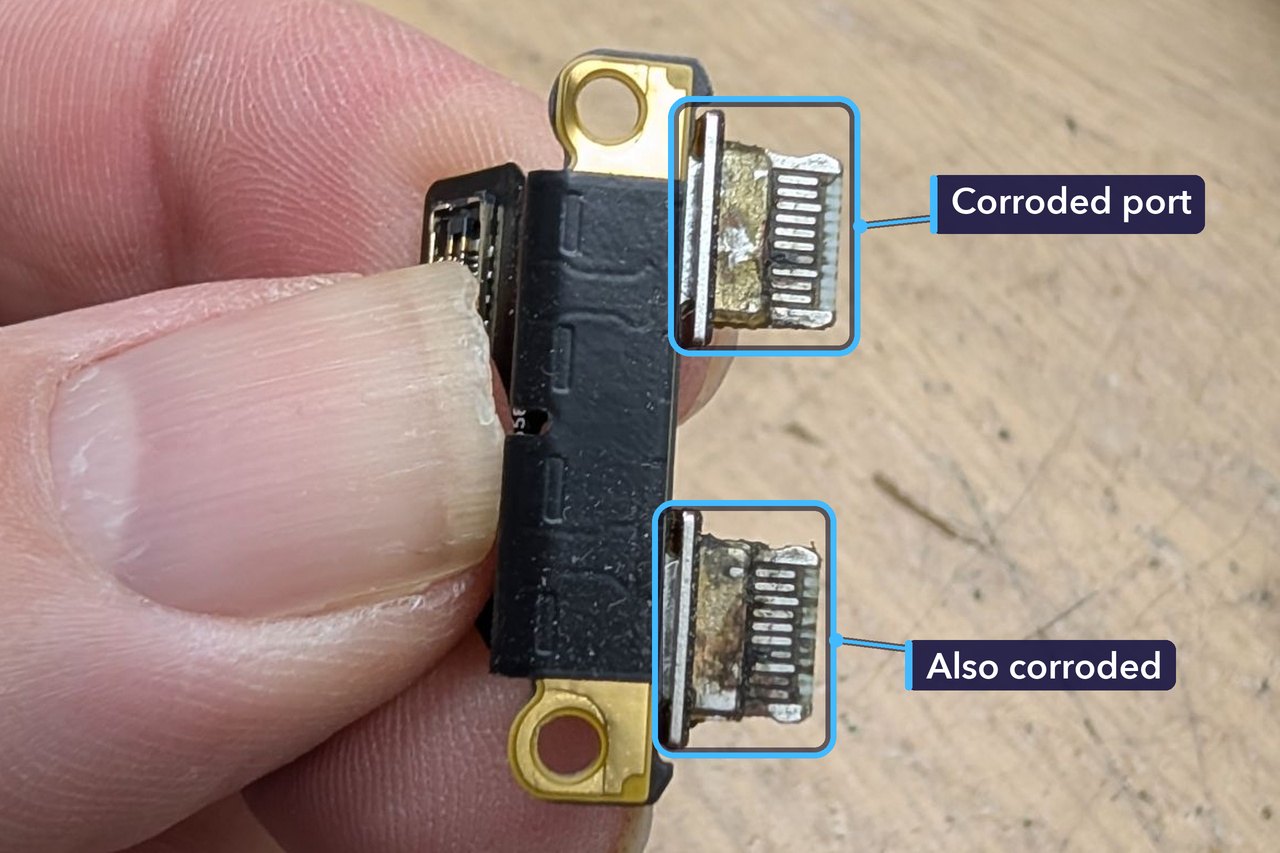
An M1 MacBook Air charges through its USB-C ports. It has two, both on the left, and either one will charge it. On this Mac, both had corrosion on them.
Corrosion is what you get when moisture sits on metal, and power running through the metal speeds it up. The metal slowly breaks down into a crust or stain that won’t wipe off, and in a charging port it eats into the tiny contacts that carry the power.
Why We Replaced the Whole Port Board
On this MacBook Air, the two USB-C ports aren’t part of the main logic board. They sit together on a small board of their own. That’s good news, because a damaged port doesn’t mean a logic board repair.
Corrosion like this doesn’t clean away for good. Once it has eaten into the metal, cleaning can’t put back what’s gone, and a damaged port can lose contact, run hot or harm the plugs that go into it. A new port board replaced both ports in one go.
We also advised a new charging cable. When a port is damaged, the cable can be damaged too. A new USB-C cable went home with the Mac.
For the Technically Curious
The machine was a 13-inch MacBook Air with Apple’s M1 chip, from 2020: model number A2337, with 8 GB of memory and a 256 GB SSD.
Both ports are Thunderbolt / USB 4, handling charging, data and an external display. A USB-C port has 24 pins, 12 on each side of the thin tongue in its middle.
Charging isn’t just power flowing down a wire. Before a USB-C charger sends anything above 5 volts, it and the Mac agree on how much power to send. That conversation runs over the port’s CC pins, short for configuration channel, and once they agree the charger can step up to as much as 20 volts.
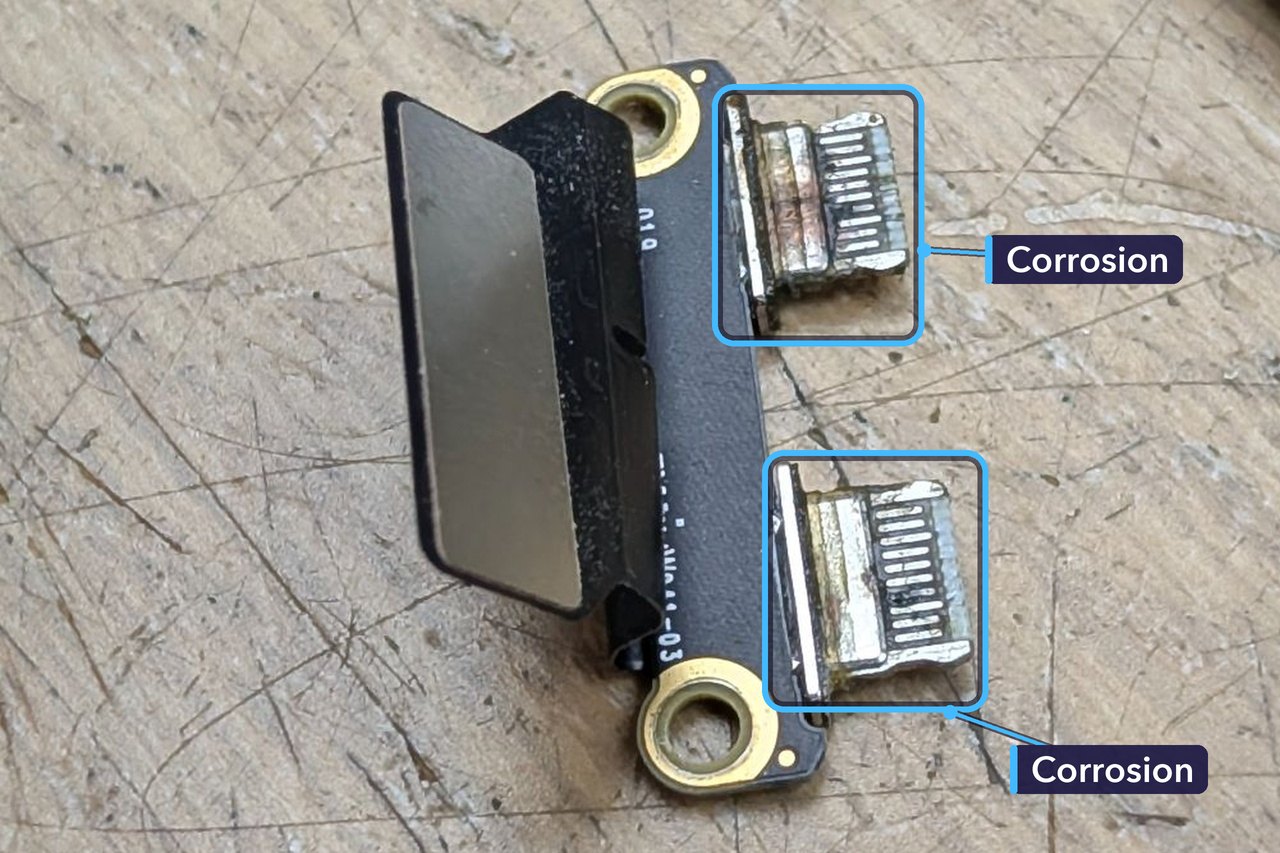
Corrosion on those pins can upset that conversation. A Mac might then charge slowly, cut in and out, or not charge at all. On the power pins, it adds resistance, which turns into heat right where the plug meets the port.
Our laptop test also checks the battery. This one was holding 79% of its original charge after 632 charge cycles. We flagged it as due a service. A battery at that level still works. It just won’t last as long on a charge as it did when new.
Looking After Your MacBook’s Charging Ports
- Swap the cable when a port has been damaged. A plug that’s been in a bad port can carry the damage straight into a new one.
- Check your plugs now and then. Look for brown or black marks, bent metal or a plug that gets hot. Any of those means it’s time for a new cable.
- Use a proper USB-C charging cable. The one we supplied is rated for 60 W, more than enough for the M1 Air’s own 30 W charger.
- Keep the ports dry. Don’t plug in with wet hands. After a spill, switch off and get it checked before you charge it again.
- Clean gently. A soft, dry brush clears fluff, while a pin or paperclip can scratch the contacts or short them out.
- If charging cuts in and out, or only works with the plug held at an angle, stop using that port and bring it in.
How Much Did It Cost, and How Long Did It Take?
£152 in total. That’s £139 for the new port board, fitted, and £13 for a new 60 W USB-C cable.
It came in just after 11 on a Monday morning, we’d found the corrosion within an hour and a half, the quote went out that afternoon, and once the customer had approved it, the Mac was ready to collect at 4:37pm. In and out the same day.
Port repairs vary. The price depends on the model, and on whether the damage has spread past the ports to the main board.
Get Your MacBook Fixed in St Andrews
If your MacBook’s charging is playing up, or a port looks discoloured, bring it in and we’ll take a look. We’ll tell you what we find and give you a quote. No appointment needed.
You can read more about our MacBook repairs, and if your charger is past its best, we sell laptop chargers too.
Repair St Andrews, 1 City Rd, St Andrews, KY16 9XQ. Call 01334 478866 or walk in. Open Monday to Friday 09:30-17:30, Saturday 10:00-17:00.
