
iPad Air 5 Won’t Turn On: A Real Repair in St Andrews
iPad Air 5 Won’t Turn On: A Real Repair in St Andrews
iPad Air 5 Won’t Turn On: A Real Repair in St Andrews
This iPad Air (5th generation) came into our City Road shop in September, booked in as an iPad with no power. It wasn’t quite as dead as it looked. Liquid had got inside and left corrosion at the backlight connector, where power reaches the light behind the screen.
It needed a replacement screen and a repair to its main board. We’d tested it and sent the quote within two days, and the bill came to £448.
What We Found Inside
An iPad that seems to have no power isn’t always dead. Sometimes it’s on, but the screen can’t show you anything. Our first checks pointed to the screen, so we plugged a new one in to test it.
The Apple logo came up for a second. Then the screen went dark. A new screen shouldn’t do that.
Inside, liquid had reached the backlight connector, and the old screen was water damaged right across it.
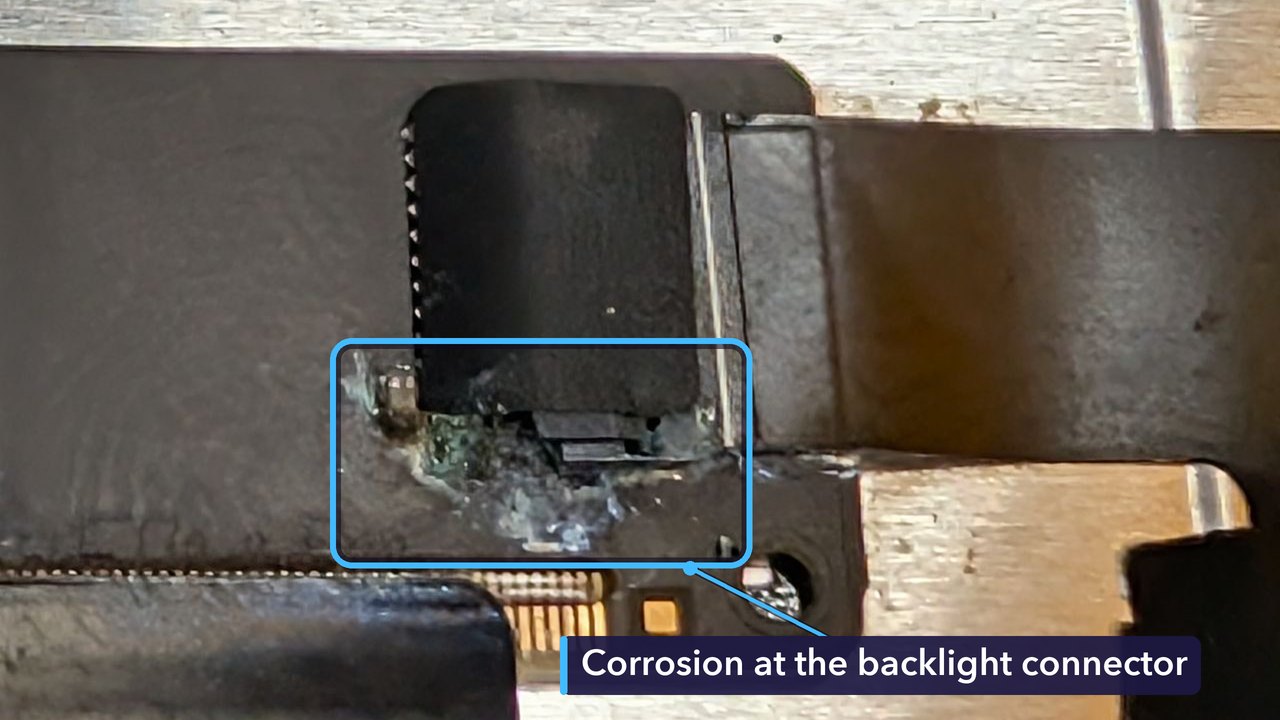
Corrosion forms when liquid sits on a circuit board and reacts with the metal in it. It won’t wipe off, and as long as there’s moisture and power about, it keeps spreading into the tiny connections around it.
Why It Needed a Screen and a Board Repair
The old screen was water damaged, so it had to be replaced. But our test had shown that a new screen on its own wouldn’t bring the iPad back, because even with a new one plugged in, the picture vanished straight after the Apple logo.
So the main board needed work too. Fitting only a screen wouldn’t have fixed it. That’s why we quoted for both.
For the Technically Curious
Apple launched the iPad Air (5th generation) in 2022, with the M1 chip and a 10.9-inch Liquid Retina screen. Liquid Retina is Apple’s name for its LCD screens. An LCD makes the picture but can’t make light, so a backlight of LEDs shines through the panel from behind.
Those LEDs need a much higher voltage than the battery gives, so a circuit on the main board steps it up and sends it to the screen through the backlight connector. If that circuit spots a fault, it can shut the backlight off to protect itself. The iPad can then be running with a black screen. Easy to mistake for no power.
Pins in a connector like this sit a fraction of a millimetre apart, so corrosion can easily make a path for current between two of them, or eat into the pins themselves.
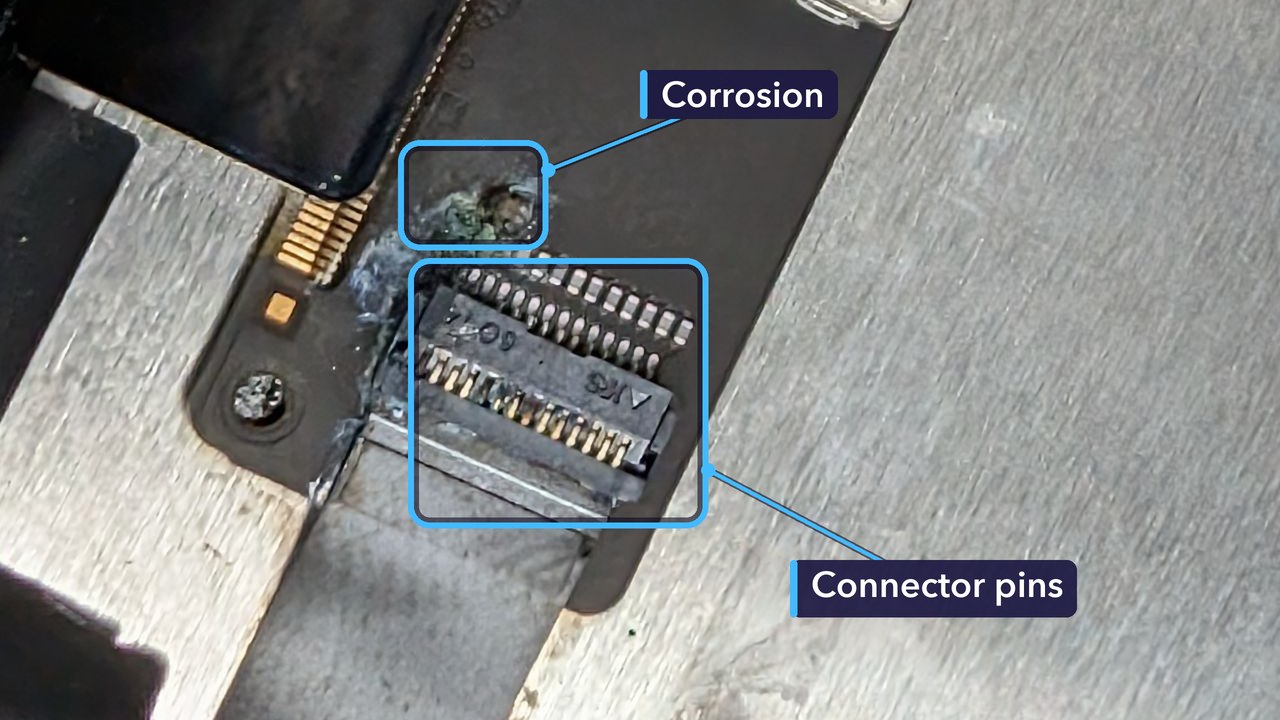
Board repair after liquid is fine work under a microscope, and it usually means cleaning off the corrosion, then testing and replacing any tiny parts the liquid has damaged.
The screen we fitted is listed for both the iPad Air 4 (2020) and the iPad Air 5 (2022), which share the same display. On both, the LCD, touch layer and glass come bonded together as one part.
iPad Won’t Turn On? Try This First
- Had a spill? Skip the rest of this list. Switch it off if it’s on, don’t charge it, and bring it in. Power running through wet parts makes corrosion far worse, and rice can’t reach liquid inside an iPad.
- No spill? Plug it into a charger and cable you know work, and leave it for up to an hour. A completely flat battery can take a while to show any sign of life.
- Try a force restart. Press and quickly release the volume button nearest the top button, then the one furthest from it, then hold the top button until the Apple logo appears.
- Shine a torch at the screen from an angle. If you can just make out a faint picture, the iPad is on and the backlight is the likely problem.
- Still nothing? Bring it in and we’ll find out why.
How Much Did It Cost, and How Long Did It Take?
£448 in total: £249 for the replacement screen and £199 for the board repair. The iPad came in on Monday 14 September. By Wednesday morning we’d tested it and sent the quote, and the customer said go ahead the same day.
The screen had to be ordered in, and the iPad was ready to collect on Saturday 26 September, with its owner picking it up the following Monday.
No two liquid jobs are alike. What it costs depends on what the liquid reached and how long it sat there before the iPad came in.
Get Your iPad Fixed in St Andrews
If your iPad won’t turn on, or it’s had a spill, bring it in. We’ll find out what’s wrong and give you a quote. No appointment needed.
Cracked glass and black or discoloured screens are all part of our iPad screen repairs. And if your iPad shuts down early or takes ages to charge, it may just need one of our iPad battery replacements.
Repair St Andrews, 1 City Rd, St Andrews, KY16 9XQ. Call 01334 478866 or walk in. Open Monday to Friday 09:30-17:30, Saturday 10:00-17:00.
